LLMs Inside the Pipeline: Turning Tickets, Contracts, and Call Notes into Tables
Dmitry Anoshin
Not every AI use case is a chatbot. The one that pays off fastest for a data team is quieter: use an LLM as a step inside a batch pipeline to turn text into columns.
Support tickets become category, product, sentiment, root_cause. Contracts become renewal_date, payment_terms, auto_renew. Sales call notes become objections, competitor_mentioned, next_step.
These fields used to need a person reading every document, or a regex that broke every quarter. Now a SQL function can do it. But a SQL function that calls a model has failure modes a CAST does not. Here is how to build it so it holds up.
The reference architecture
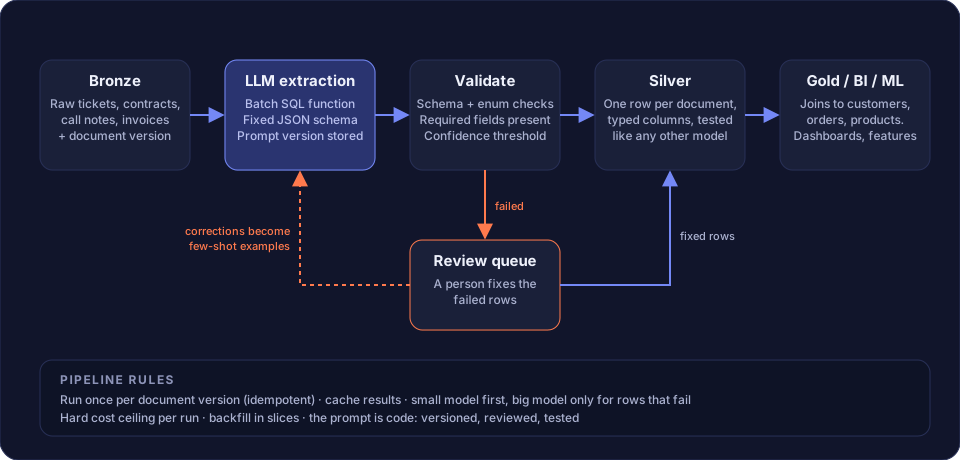
It is a normal medallion flow with one new box. The LLM step sits between Bronze and Silver, and it has a validation step and a review queue around it. Those two boxes are what separate a working pipeline from a demo.
Extraction: batch, not per row
Both main platforms give you batch inference as a SQL function. Databricks has ai_query and the ai_extract family. Snowflake has AI_EXTRACT and AI_COMPLETE in Cortex. Run it over a table, not in a loop from Python.
Three rules for the extraction step:
- Fixed output schema. Ask for JSON with named fields and types. Both platforms support structured output. Free text is not a column.
- Enums, not free text, for categories. Give the model the list of allowed values. “Billing”, “Shipping”, “Product defect”. Otherwise you get 40 spellings of the same category.
- Store the prompt version with every row. When you change the prompt, you need to know which rows were produced by which version. Treat the prompt as code: versioned, reviewed, tested.
Validation: the step people skip
The model will return bad JSON sometimes. It will invent an enum value. It will leave a required field empty. It will give a date in the wrong format.
Validate every row before it reaches Silver:
- JSON parses and matches the schema.
- Every category is in the allowed list.
- Required fields are present.
- Dates and numbers cast cleanly.
- If the model returns a confidence, apply a threshold.
Rows that pass go to Silver. Rows that fail go to the review queue. Nothing fails silently into the table.
The review queue is part of the design
Some rows will always need a person. Build the queue on day one, not after the first bad dashboard.
- A table of failed rows with the raw text, the model output, and the reason it failed.
- A simple UI or even a spreadsheet where someone corrects them.
- Corrected rows go to Silver.
- Corrected rows also become few-shot examples in the prompt. This is the feedback loop that makes the pipeline better each month without touching the model.
Measure the review rate. If it goes up after a prompt change, roll back.
Silver is a normal table
Once a row passes validation, it is just data. One row per document version, typed columns, a primary key, dbt tests for uniqueness and accepted values. It joins to customers, orders, and products in Gold like any other source.
This is the point of the whole approach. The AI step is contained. Everything downstream is ordinary data engineering that your team already knows how to run.
Cost and safety rules
A CAST costs nothing. A model call costs money and time. Rules that have saved us:
- Idempotent per document version. Never re-extract a document that has not changed. Key on content hash or source version.
- Cache results. Same input, same prompt version, same output. Store it.
- Small model first. Use the cheapest model that passes validation. Escalate to a bigger one only for rows that fail. Most rows are easy.
- Hard cost ceiling per run. A backfill of two million tickets with a large model is a very expensive mistake. Cap tokens per job and alert before the cap.
- Backfill in slices. Run one month, check the review rate and the cost, then continue.
Where to start
Pick one document type with one clear consumer. Support tickets feeding a product quality dashboard is a good first case: the volume is real, the fields are obvious, and the people who read the dashboard can tell you fast whether the categories are right.
Build the validation and the review queue in the first week. If the extraction step is the only thing you build, you will spend the second month cleaning the table by hand.
We design and build LLM-powered pipelines on Databricks and Snowflake as part of our AI data engineering service. Book a call to scope a first use case.