The Roll-Up Data Layer: How to Plug Company N+1 into One Platform
Dmitry Anoshin
The second acquisition is when a roll-up finds out it has a data problem. Two accounting systems, two customer lists, two meanings of the word “job”, and a board that wants one number.
By the tenth acquisition it is either a platform or a pile. The difference is whether the integration was designed once or done again each time.
This post describes the design we recommend. It works the same on Databricks and on Snowflake.
The reference architecture
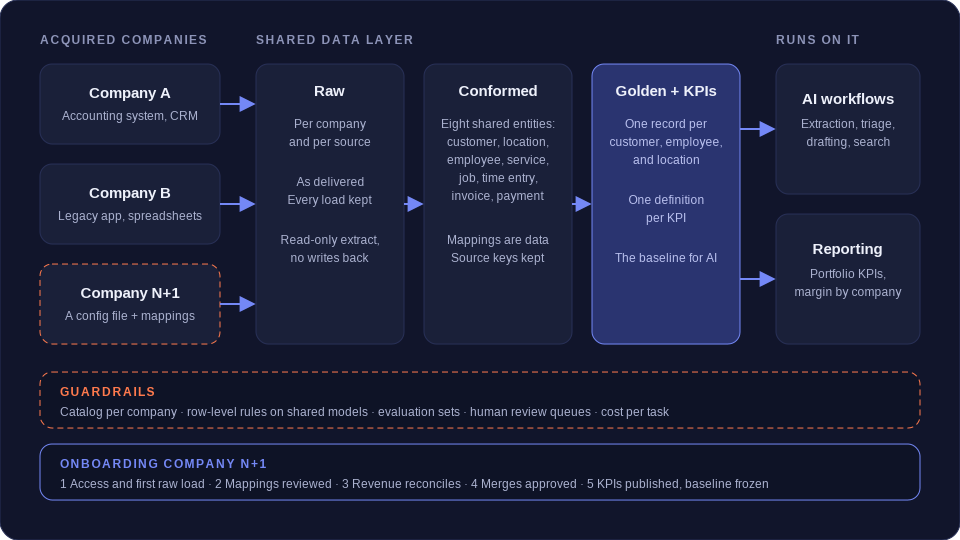
Each acquired company enters on the left. Nothing on the right has to change when it does. That is the whole point.
1. Extract read-only, per company
- No production writes. The acquired company keeps running exactly as before.
- Land data as delivered, in a raw zone separated by company and by source system.
- Keep every load. Raw history lets you rebuild the model when a mapping turns out to be wrong.
- Accept exports. For a system with no API, a scheduled CSV to cloud storage is fine. A weekly file beats a six-month connector project.
2. Conform to one small model
The shared model is small on purpose. A service business needs about eight entities.
| Entity | What maps into it |
|---|---|
| Customer | Clients, accounts, households, property owners |
| Location | Offices, branches, service areas |
| Employee | Staff, technicians, contractors |
| Service | Service codes, engagement types, job types |
| Job | Engagements, work orders, tickets, cases |
| Time entry | Timesheets, dispatch logs |
| Invoice | Invoices and credit notes |
| Payment | Receipts and refunds |
Each company gets a mapping from its source tables to these entities. The mapping is data, not code. It is a table of source codes and shared codes, kept in version control, with an owner at that company.
Two rules:
- Keep the source keys. Every conformed row carries the company, the source system, and the original key. You will need to trace a number back.
- Do not force a fit. If a company has a concept with no counterpart, keep it as company-specific. Do not bend the shared model for it.
3. Resolve identity
The same customer exists in three companies under three spellings. The same employee is in payroll and in the job system with different IDs.
- Match on hard keys first: tax ID, email, phone, normalized address.
- Use fuzzy matching only to propose candidates. A person approves the risky merges.
- Agree the survivorship rules with the business. Which source wins for each field is not an engineering decision.
- Never destroy the originals. A golden record is a link between source records, so a wrong merge can be undone.
Reporting should not wait for this. Consolidated reports can go live on the conformed model while identity work is still in progress. The full method is in identity resolution for a roll-up.
4. Define each KPI once
Gross margin, revenue per employee, utilization, turnaround time. One definition, in code, in one place. Use dbt models or metric views, and compute every company the same way.
This layer is also the baseline for AI. If you later claim that a workflow saved hours, this is where “the hours” were measured before.
5. Isolate the tenants
Companies in a roll-up are still separate legal entities, with their own clients and contracts.
- One catalog or database per company for raw and conformed data.
- A shared area for cross-company models, with row-level rules by company.
- Roles per company. A manager at company A does not see company B.
- Tag sensitive columns once in the shared model, so masking follows the data.
On Databricks this is a Unity Catalog catalog per company plus a shared catalog. On Snowflake it is a database per company plus row access policies on the shared tables. We compare the two in Databricks or Snowflake for a roll-up.
Company N+1 is configuration
The test of the design is the next acquisition. Onboarding should be a config file and a checklist.
company: northside-accounting
sources:
  - system: quickbooks_online
    method: api
    schedule: daily
  - system: practice_mgmt_legacy
    method: csv_export
    path: s3://rollup-raw/northside/practice/
    schedule: weekly
mappings: mappings/northside/
data_owner: office-manager
The checklist:
- Access granted and the first raw load landed.
- Mappings filled in and reviewed with the company.
- Reconciliation passed: conformed revenue matches the accounting system within an agreed tolerance.
- Identity matching run and merges approved.
- KPIs published and the baseline frozen.
Track the days from close to step 5 for every company. If that number is not falling, the platform is not doing its job.
What not to do
- Do not replace their systems first. A forced migration in month one costs goodwill and hides the baseline.
- Do not build dashboards per company. Build one and filter it by company.
- Do not let AI read raw data. Workflows read the conformed layer, with its permissions and definitions.
- Do not wait for a perfect model. Day-one reporting on four entities is worth more than a complete model in month nine.
Where AI fits
AI workflows sit on top of this layer, not beside it. Document extraction writes into the same conformed tables. Search and ask-the-data read the same governed definitions. A workflow built for one company is switched on for the next when its data arrives.
Without the layer, every AI workflow is a one-off integration against one company’s systems. That is how you get the problem Tower Research described: putting AI into business N+1 “is not much easier than doing so for business N.”
Next in this series: where AI removes work first. Before that, see what to check in diligence.
Building this layer is the core of our AI roll-up engineering practice. Get in touch to review your integration plan.