One Customer, Five Records: Identity Resolution for a Roll-Up
Dmitry Anoshin
After the third acquisition someone on the board asks a simple question. How many customers do we have?
Nobody can answer. The same family is a client of two accounting offices. The same landlord uses three of your property managers. The same technician is in payroll under one ID and in the dispatch system under another.
Identity resolution is the work of finding out. It is also where a roll-up can do real damage if it is careless. A wrong merge can put one client’s documents in front of another client.
What to resolve, and why
| Entity | Why it matters in a roll-up |
|---|---|
| Customer | Customer count, concentration risk, cross-sell, one view of receivables |
| Location or property | Route density, service history at an address |
| Employee | Headcount, utilization, revenue per employee |
| Vendor | Purchasing terms, duplicate payments |
Start with customers. It is the hardest entity, and the one the board asks about first.
Step 1: standardize before you compare
Most “fuzzy matching” problems are formatting problems.
- Names. Trim, fix the case, remove punctuation. Split person names into parts. For businesses, move legal suffixes such as LLC, Inc., and Ltd. into their own field.
- Phones. Convert to one format with a country code. Put extensions in a separate field.
- Emails. Lowercase them. Keep shared addresses such as
info@andoffice@out of matching, because many people use them. - Addresses. Run them through a postal standardization service. “Ste 4” and “Suite #4” must end up as the same string.
Keep the original values. Standardized columns sit next to them, never on top of them.
Step 2: block, so you do not compare everything
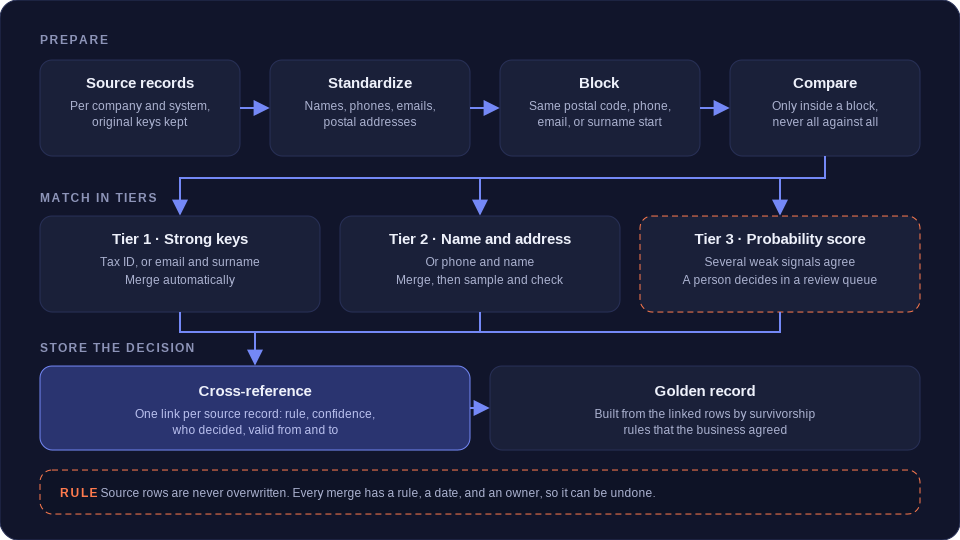
Comparing every record with every other record does not scale, and it produces noise. Group records into blocks first, and compare only inside a block. Useful blocks are the same postal code, the same phone, the same email, or the same first letters of the surname.
Step 3: match in tiers
| Tier | Rule | Action |
|---|---|---|
| 1 | Same tax ID, or same email and same surname | Merge automatically |
| 2 | Same standardized name and address, or same phone and name | Merge automatically, and sample for checking |
| 3 | A probability score built from several weak signals | Send to review |
Tier 3 is where open-source tools such as Splink or Zingg help. They estimate how much each field agreement is worth and return a match probability. Use them to propose pairs. Do not let them merge on their own until you have checked their output on your data.
Most of the work is still a plain rule in SQL:
-- Tier 1: same email and surname, two different source records
select
  a.source_key      as left_key,
  b.source_key      as right_key,
  'email_surname'   as match_rule
from customer_std a
join customer_std b
  on  a.email_std   = b.email_std
  and a.surname_std = b.surname_std
  and a.source_key  < b.source_key
where a.email_std is not null
  and a.email_is_shared = false;
Step 4: tune for precision, not for recall
In marketing data a wrong merge is a small error. In a service business it is not.
- Two people with the same name at the same address are often a parent and a child.
- A business owner can be a personal client and a business client. That is two customers with one contact.
- Merge them, and the wrong person may receive a tax document, a statement, or a payment reminder.
So set the thresholds so that a merge is almost never wrong, and accept that some true matches are missed. A missed match makes a report slightly off. A wrong match is an incident.
Never merge automatically on a name alone.
Step 5: store links, not overwrites
The output is not a cleaned customer table. It is a cross-reference:
create table mdm.customer_xref (
  golden_id      string,        -- the resolved customer
  company_id     string,
  source_system  string,
  source_key     string,        -- the original id, unchanged
  match_rule     string,        -- 'tax_id', 'email_surname', 'manual', ...
  confidence     decimal(5, 4),
  decided_by     string,        -- 'rule', or a reviewer's id
  valid_from     timestamp,
  valid_to       timestamp
);
The golden record is built from the linked source rows by survivorship rules. A survivorship rule says which source wins for each field. For example: the billing address comes from the accounting system, and the phone number from the most recently updated record. Finance and operations decide these rules. Engineering implements them.
The links carry dates and the source rows are untouched, so any merge can be undone. You will need that.
Step 6: run a review queue
Tier 3 pairs go to a person. The screen shows both records side by side, with the fields that agree and the fields that differ. The reviewer picks one of three answers: same, different, or not sure.
- Store “different” decisions too. Otherwise the same pair comes back next week.
- Ask staff at the acquired company to review. They know the clients.
- Watch the backlog. A review queue nobody works is the same as no matching.
Keep it running
Matching is not a one-time project. New customers arrive every day, and every acquisition adds a full new set.
- Match new and changed records daily against the existing golden records.
- Monitor three numbers: the automatic merge rate, the review backlog, and the count of unmerges. A jump in unmerges means a rule is too loose.
- Run the full match again when a new company joins.
Identity is not permission
A golden ID says that two records are the same customer. It does not say that company A may see what company B knows about that customer. Client contracts and privacy rules still apply to each company’s data.
Keep the cross-reference in a restricted area, and apply access rules per company to everything built from it.
Where it sits
Identity resolution is step three of the roll-up data layer. Reporting on the conformed model can go live before it is finished. Customer counts, concentration analysis, and cross-sell cannot.
Identity resolution is part of the shared data layer we build in our AI roll-up engineering practice. Get in touch if your customer count is still a guess.